MRZ integrity
Machine-readable zone check digits are validated deterministically. A failed checksum is a concrete inconsistency, not a visual hunch.
Check the document behind the identity. VerifyPDF reads a clear photo or scan, validates machine-readable data and returns the evidence behind its risk rating. Rolling out from summer 2026.
Identity documents are physical objects, so the right input is a clear photo or scan rather than a print-to-PDF copy. VerifyPDF accepts JPG, PNG and HEIC/HEIF and automatically identifies the document type.
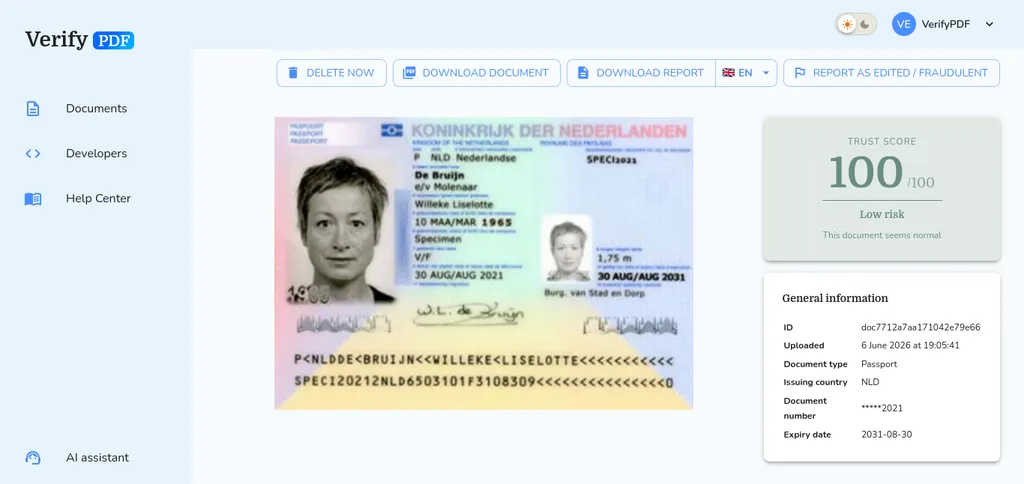
The identity pipeline prefers a missed warning over a false accusation. A check fires only when the document contains a clear deterministic inconsistency.
Machine-readable zone check digits are validated deterministically. A failed checksum is a concrete inconsistency, not a visual hunch.
The document number, date of birth and expiry date printed on the document are cross-checked against the encoded MRZ when both are available.
Expired documents are surfaced, while original image metadata is checked for editor traces and other provenance anomalies without guessing when evidence is weak.
VerifyPDF answers whether the submitted passport or ID is internally consistent. It does not claim to prove who is holding it.
A clear capture goes through three focused stages before your team sees the result.
Use a sharp, head-on photo or scan with all four corners visible and no glare across the text.
The pipeline classifies the ID, reads its fields and applies the checks relevant to that document.
See the trust score, risk band and warnings alongside the country, expiry and masked document number.
Result data keeps the document number masked. Names and dates of birth are not persisted in the identity result record.
Read about securityPassports, driver's licences, national IDs and residence permits. Upload a clear photo or scan in JPG, PNG or HEIC/HEIF format.
The result identifies the document type and issuing country, then shows the expiry date and a masked document number alongside the trust score and risk rating.
No. VerifyPDF checks the submitted identity document for internal consistency and integrity signals. It does not confirm that the uploader is the person shown, run a liveness challenge or replace a biometric identity-proofing provider.
Either works when the image is clear. Capture all four corners, keep the document flat and sharp, use even lighting and avoid glare over the MRZ or laminate.
Identity document verification is rolling out from summer 2026. Availability may be enabled progressively across accounts while the new pipeline is monitored and calibrated.
Upload a clear passport or ID image, receive an explainable result and keep the final onboarding decision with your team.
This document is identical to others from this issuer