Buy a prepaid bundle
Buy extra documents step by step from Billing and Prepaid Packages, review the invoice preview with tax and pay by card with 3-D Secure if your bank asks.
Prepaid bundles add extra documents on top of your plan. You buy them from the Billing page. This article walks you through the purchase. To learn how bundles are used, see How prepaid bundles work.
Before you start
You need an active subscription to buy a bundle. A no-plan or trial-only account cannot buy one. If you are on a trial, start a paid plan first. See Plans explained.
Billing is admin-only, so only an admin can buy a bundle.
Buy a bundle step by step
- Sign in at secure.verifypdf.com.
- Go to Billing.
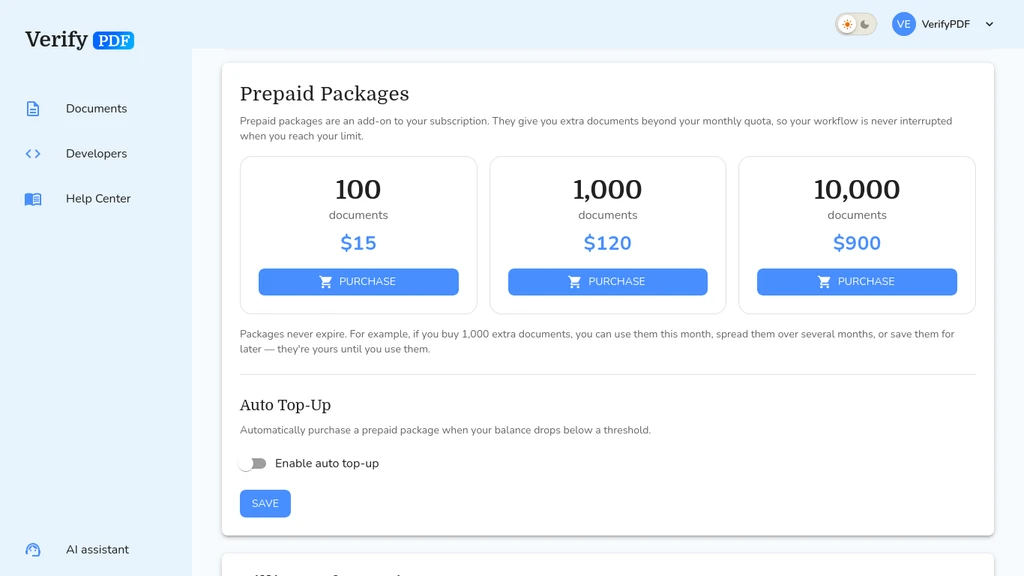
- Find the Prepaid Packages card.
- Pick the package you want.
- Review the invoice preview, which shows the total with tax.
- Confirm the purchase.
Payment is by card through Stripe. Your bank may ask for an extra card confirmation, known as 3-D Secure. Approve it in your banking app or by code to finish.
Bundle sizes and prices
- 100 documents for $15
- 1,000 documents for $120
- 10,000 documents for $900
For the latest prices, check the pricing page.
After you buy
Your prepaid balance goes up right away. You can confirm it on the Billing page. See Check your usage and allowance.
Bundle documents are used only after your monthly allowance runs out, and they do not expire at the end of the month.
Never run out
If you would rather not buy by hand each time, turn on automatic top-ups. See Set up automatic top-ups.