Find your invoices
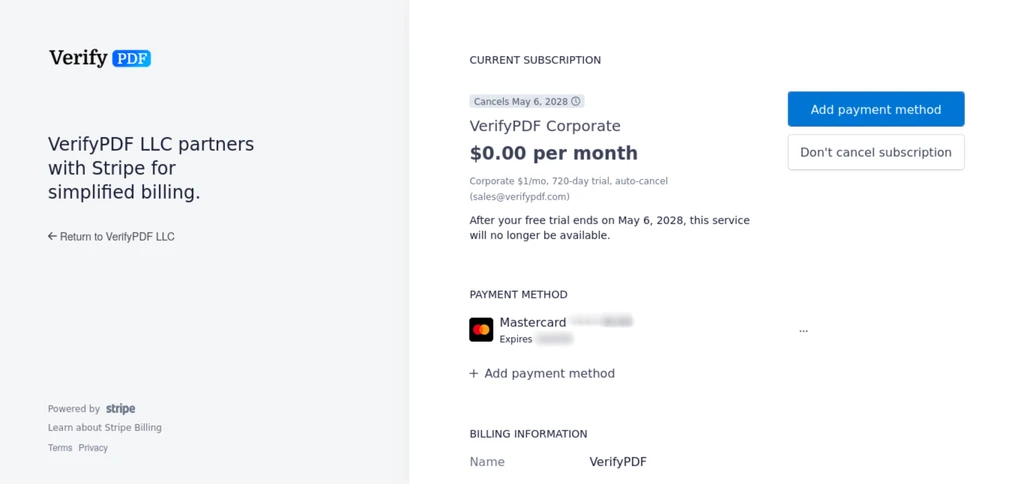
Open the Stripe customer portal from the Billing page to view and download your invoices and to update the card on file for VerifyPDF.
VerifyPDF handles billing through Stripe, so your invoices live in the Stripe customer portal. You open that portal from the Billing page. This article shows you how.
Open the Stripe customer portal
- Sign in at secure.verifypdf.com.
- Go to Billing.
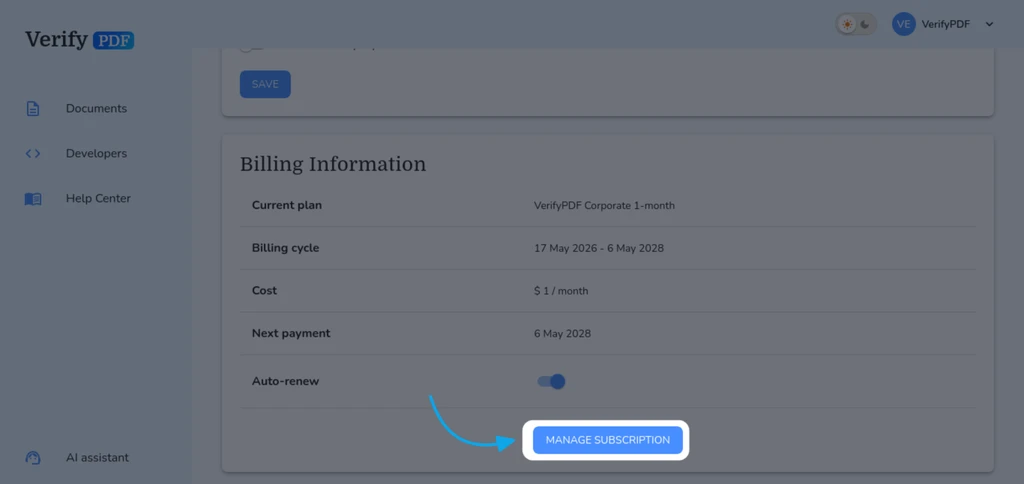
- Find Billing information, which shows your current plan and next payment date.
- Click the Manage Subscription button to open the Stripe customer portal.
Billing is admin-only. If you do not see the Billing page, you are a regular member. Ask your admin for a copy of an invoice.
View and download invoices
Inside the Stripe portal you can:
- See your full list of invoices.
- Open any invoice.
- Download an invoice as a PDF for your records.
VerifyPDF does not keep a separate invoice list. Invoices live in the Stripe portal, so always go there to find them.
Update your card
You also update your payment card in the Stripe portal. Open it from the Billing page, then edit the card on file. A current card keeps your subscription and any automatic top-ups running. See Set up automatic top-ups.
Related tasks
- Check what you have used and what is left in Check your usage and allowance.
- Upgrade, downgrade or cancel in Change or cancel your plan.