Download or share a report
Open a verified document, download its PDF report and switch the report language so you can keep or share the result.
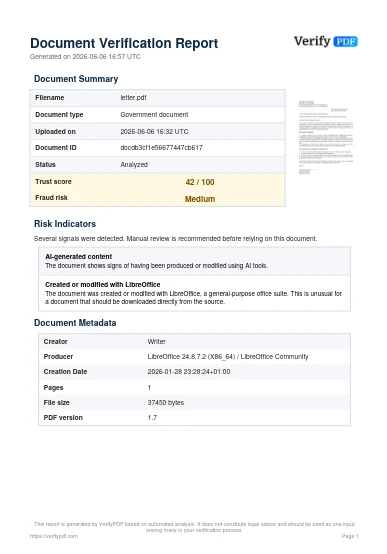
Every analyzed document comes with a downloadable PDF report that captures the trust score, the fraud-risk rating and the warnings. You can keep it for your records or send it to a colleague.
Open the document
- Go to the Documents page in the dashboard at secure.verifypdf.com.
- Find the document you want. You can search or page through your list. See find and manage past documents.
- Click the document to open its full detail view.
Download the report
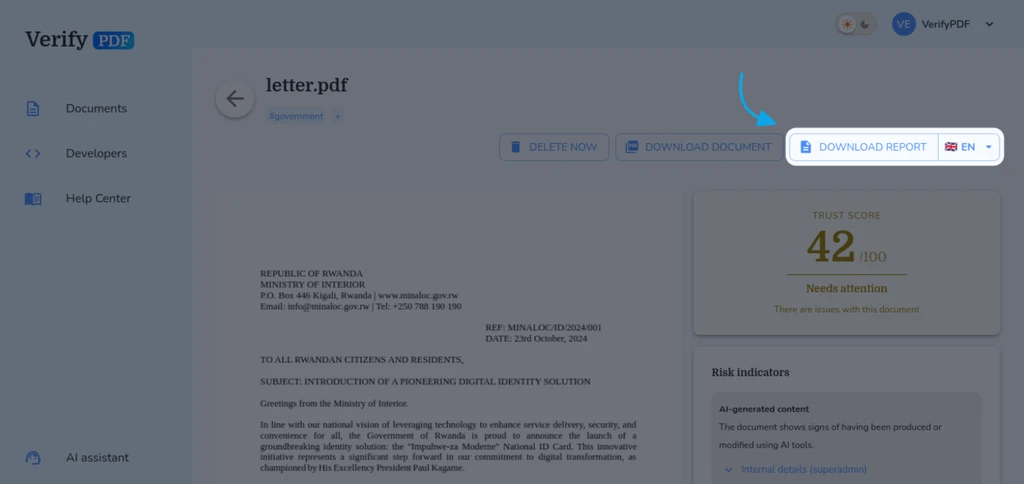
- In the detail view, find the download report action.
- Click it to save the PDF report to your device.
- The report is a single PDF that includes the score, the rating and the list of warnings.
Switch the report language
You can produce the report in a different language before you download it.
- In the document detail view, find the report language option.
- Pick the language you want.
- Download the report. It regenerates in that language.
This is handy when the person who needs the report reads a different language than the one you work in.
Other downloads
The detail view can offer more than the PDF report:
- Download document retrieves the original file you uploaded.
- Download recovered, when it is offered, gives you the document as it was before it was modified. Whenever VerifyPDF can recover that earlier version, we provide it so you can compare it with the file you uploaded and see exactly what changed.
Share the report
The report is a self-contained PDF, so sharing it is simple:
- Email it as an attachment, or
- Upload it to your usual file-sharing or case-management tool.
The person you send it to does not need a VerifyPDF account to open the PDF.
What to do next
- Learn what each part of the report means in read your verification result.
- Manage your full history on the past documents list.