Set up automatic top-ups
Turn on automatic top-ups so VerifyPDF buys a bundle for you when your prepaid balance drops below a threshold you set, and learn how to turn it off.
Automatic top-ups keep your verifications running without you watching the balance. When your prepaid balance gets low, VerifyPDF buys a bundle for you. This article shows you how to set it up.
What automatic top-up does
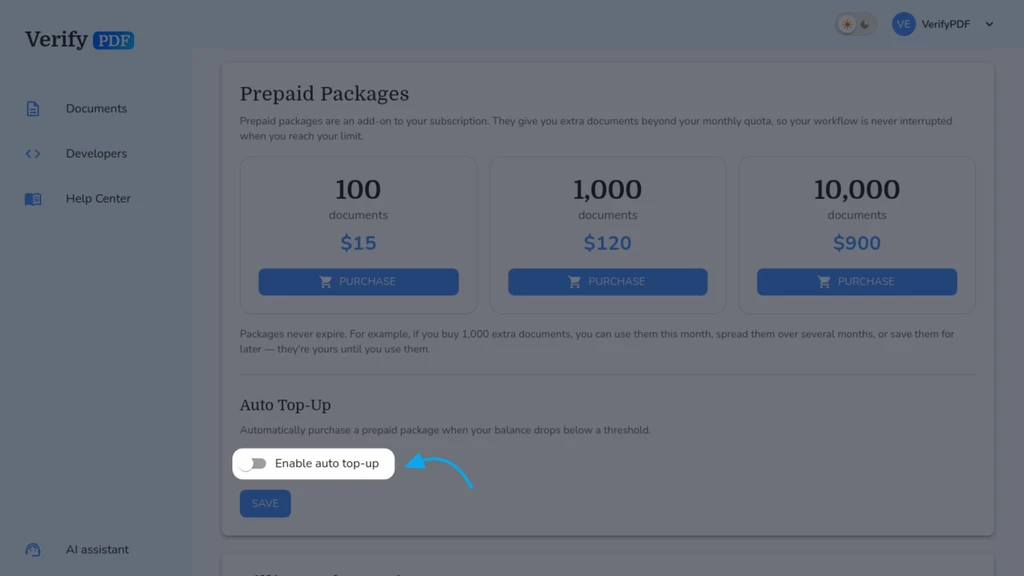
You pick a threshold and a bundle. When your prepaid balance drops below the threshold, VerifyPDF automatically buys the bundle you chose. This tops up your balance so verifications never stop. You can turn it off whenever you want.
Before you start
Automatic top-up buys a bundle, so you need an active subscription. Billing is admin-only, so only an admin can set this up. To learn how bundles work, see How prepaid bundles work.
Turn on automatic top-ups
- Sign in at secure.verifypdf.com.
- Go to Billing.
- Open the Prepaid Packages area.
- Turn on automatic top-ups.
- Set the threshold that triggers a refill.
- Choose the bundle to buy each time.
- Save your settings.
Each automatic purchase is paid by card through Stripe, the same way a manual bundle is. See Buy a prepaid bundle for how the charge works.
Turn off automatic top-ups
- Go to Billing, then the Prepaid Packages area.
- Turn off automatic top-ups.
You can turn it back on at any time.
Keep an eye on your balance
Even with automatic top-ups on, you can check your balance and recent activity on the Billing page. See Check your usage and allowance.